Stay up to date with the weather directly from your Momentum dashboard.
Weather :cloud-sun: displays the current conditions and temperature in the top-right corner, so you can quickly check the forecast while planning your day.
💡 Tip: Keep the forecast alongside your daily focus, tasks, and other dashboard essentials so you can check the weather without switching to another app or tab.
Turn Weather on or off
Weather is on by default, but you can hide it anytime if you'd like a simpler dashboard.
- Click Settings :settings-2:
- Navigate to the General section
- Under Apps, toggle Weather on or off
Switch between °C and °F
Choose the temperature unit that works best for you. You can change it from the weather menu or Settings :settings-2:
From the weather menu:
- Click the weather info at the top-right corner of your dashboard
- Click the ellipsis ... in the weather menu
- Toggle Metric units on or off
From Settings:
- Click Settings :settings-2:
- Go to the General section
- Under Format and units, choose Metric (°C) or Imperial (°F)
Change your Weather location
Set your weather to any city or location in a click. Easily plan trips, check travel conditions, or keep tabs on weather anywhere without leaving your dashboard.
Using the location icon
- Click the weather info at the top-right corner of your dashboard
- Click the location icon at the top-right of the weather menu
- Type in your desired location
- Select it from the list to display weather for that location
Using the menu
- Click the weather info at the top-right corner of your dashboard
- Click the ellipsis ... at the top-right of the weather menu
- Click Change location and enter your desired location
Go deeper with your forecast
❇️ Momentum Plus Exclusive
Upgrade to Momentum Plus to unlock more detailed weather insights right inside your dashboard. See the full Extra weather info ↗ article for step-by-step instructions.
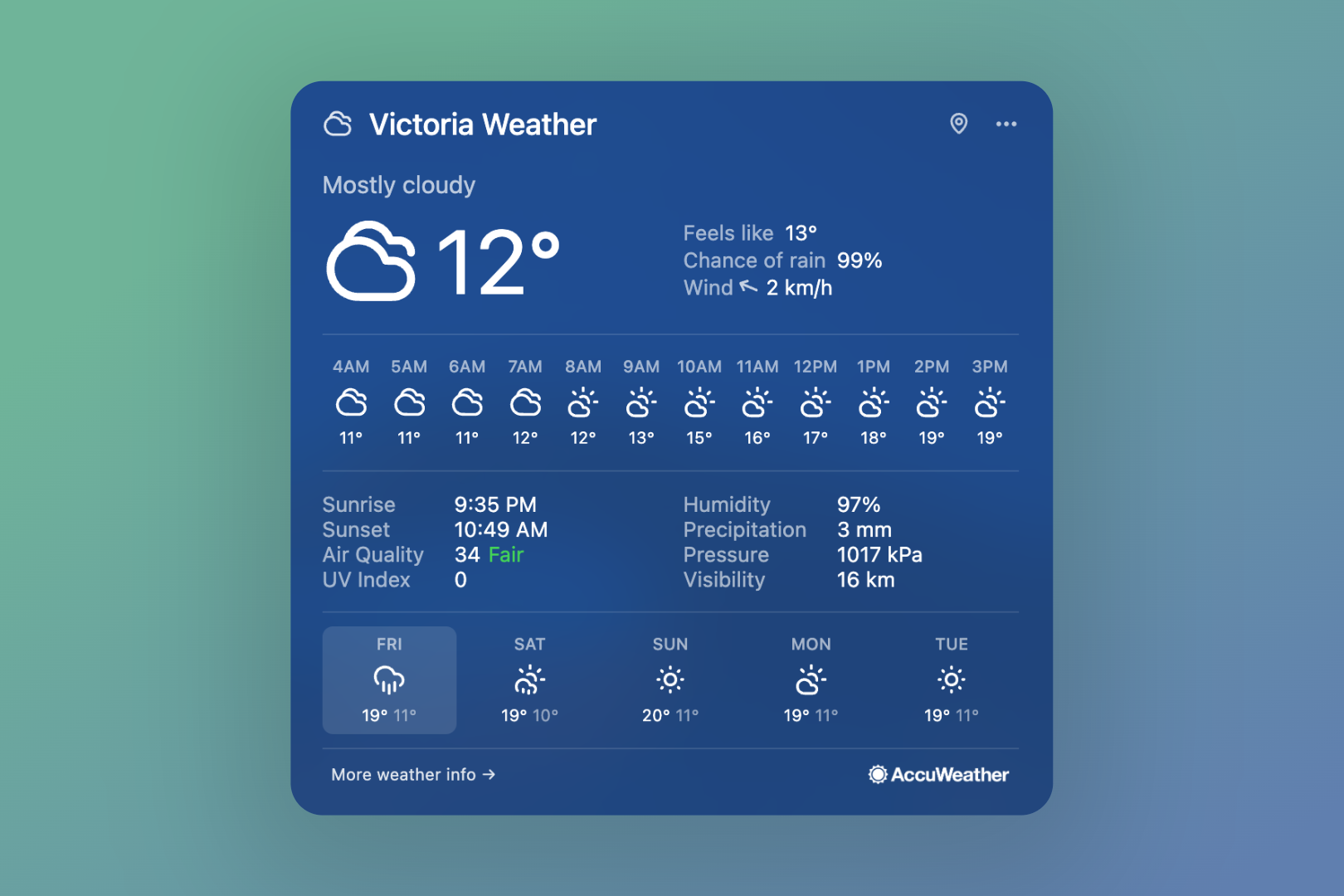
View hourly forecasts
See a breakdown of upcoming weather by the hour, making it easier to plan around changing conditions throughout the day.
Access detailed weather metrics
Get more context on your local forecast with additional data, including:
- "Feels like" temperature
- Chance of rain
- Sunrise and sunset times
- Air quality
- UV index
- Wind speed and direction
- Humidity
- Precipitation levels
- Visibility
- Atmospheric pressure
Upgrade to Momentum Plus ↗ to unlock full weather insights and more.
FAQs
:::faq
Q: Why isn't Weather showing on my dashboard?
A: Check that Weather is toggled on under Settings :settings-2: > General > Show. If it's already on and still not appearing, try refreshing your dashboard or checking your internet connection.
Q: Where does Momentum get its weather data?
A: Momentum's weather information is provided by AccuWeather.
Q: Can I track weather for more than one location?
A: Your dashboard shows weather for one location at a time. You can switch it anytime from the weather menu, so it's easy to check somewhere else before you travel.
Q: What extra weather details come with Momentum Plus?
A: Momentum Plus unlocks hourly forecasts along with detailed metrics like feels like temperature, chance of rain, humidity, UV index, and more.
:::